
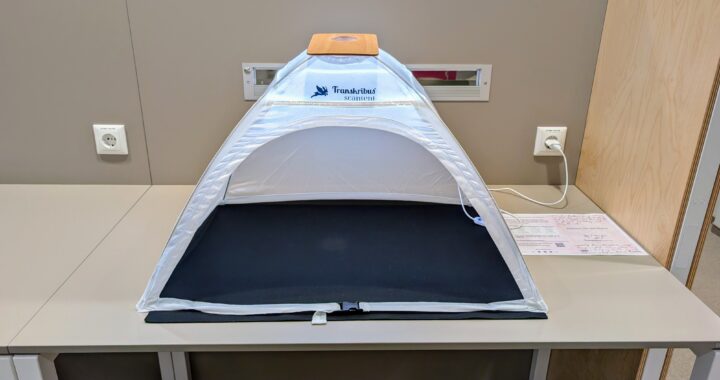
Als Alternative zum Scannen an unseren Aufsichtsscannern können Sie in der Bibliothek nun auch mit Ihrem eigenen Handy in Scan-Zelten Literatur einscannen.
Sie benötigen hierfür eine beliebige Scan-App, die Sie ggf. zuerst installieren müssten.
Legen Sie dann Ihr Smartphone in die Halterung auf dem „Dach“ des Zeltes, so dass es nicht verrutscht und der Abstand immer gleich ist.
Das zu scannende Dokument (Buch, Zeitschriftenheft usw.) legen Sie in den Innenraum des Zeltes.
Für eine optimale Ausleuchtung können Sie zudem eine LED-Lichtleiste einschalten.
Mit dem Scan-Zelt lassen sich Formate bis zu einer Größe von DIN A3 scannen.
Die Nutzung ist kostenlos. Bitte beachten Sie immer das Urheberrecht.
Die Bibliothek hat insgesamt zwei Scan-Zelte. Eins steht in der Hauptbibliothek AR, auf Ebene O im Bereich der Zentralen Information und ein zweites in der Teilbibliothek US auf der Ebene 1 gegenüber von den Semesterapparaten „Grundlagen Recht“.
//
As an alternative to scanning at our „Aufsichtsscannern“, you can now also scan literature in the library using your own mobile phone in scanning tents.
To do this, you will need a scanning app, which you may need to install first. Then place your smartphone in the holder on the ‘roof’ of the tent so that it does not slip and the distance remains the same.
Place the document to be scanned (book, magazine, etc.) inside the tent. For optimal lighting, you can also switch on an LED light strip.
The scan tent can be used to scan formats up to A3 size.
Use is free of charge. Please always observe copyright laws.
The library has a total of two scan tents. One is located in the Main Library AR, on level O in the central information area, and a second one is located in the US branch library on level 1 opposite the „Semesterapparate Grundlagen Recht“.

